Free public beta — no card

Projects aren’t built from lists.

They’re built from dependencies. Linqtab lays the work out on a canvas — tasks linked by what blocks what, a lifecycle that says who accepts and who reviews, documents your team edits together, and a plan you can read day by day.

Born in game production — and at home with any project you mean to ship, with a team or on your own.

Free while in beta. No card, no trial timer. Verify your email and you are in.

The Linqtab board canvas: task cards grouped into two areas — “Gameplay & level” and “Systems & shipping” — joined by dependency links, with the status counters above A task page in Linqtab: the lifecycle stepper with “In Progress” highlighted, the description, two comments and the field panel with priority, status, assignee and dates A project document in Linqtab: rendered markdown with a table, a checklist and a code block, next to the document tree and the outline Day planning in Linqtab: a two-week timeline where every person gets a section and each task shows a planned bar with the actual progress filled in

01 / The board

Somewhere in the backlog, a task is quietly blocking the demo.

On a list you find out when it’s late. On the Linqtab canvas tasks hang off real dependencies — grouped into the areas your production actually has, with a badge on every card that counts what it still waits on. Zoom out, and the blocked path is visible before anyone starts on it.
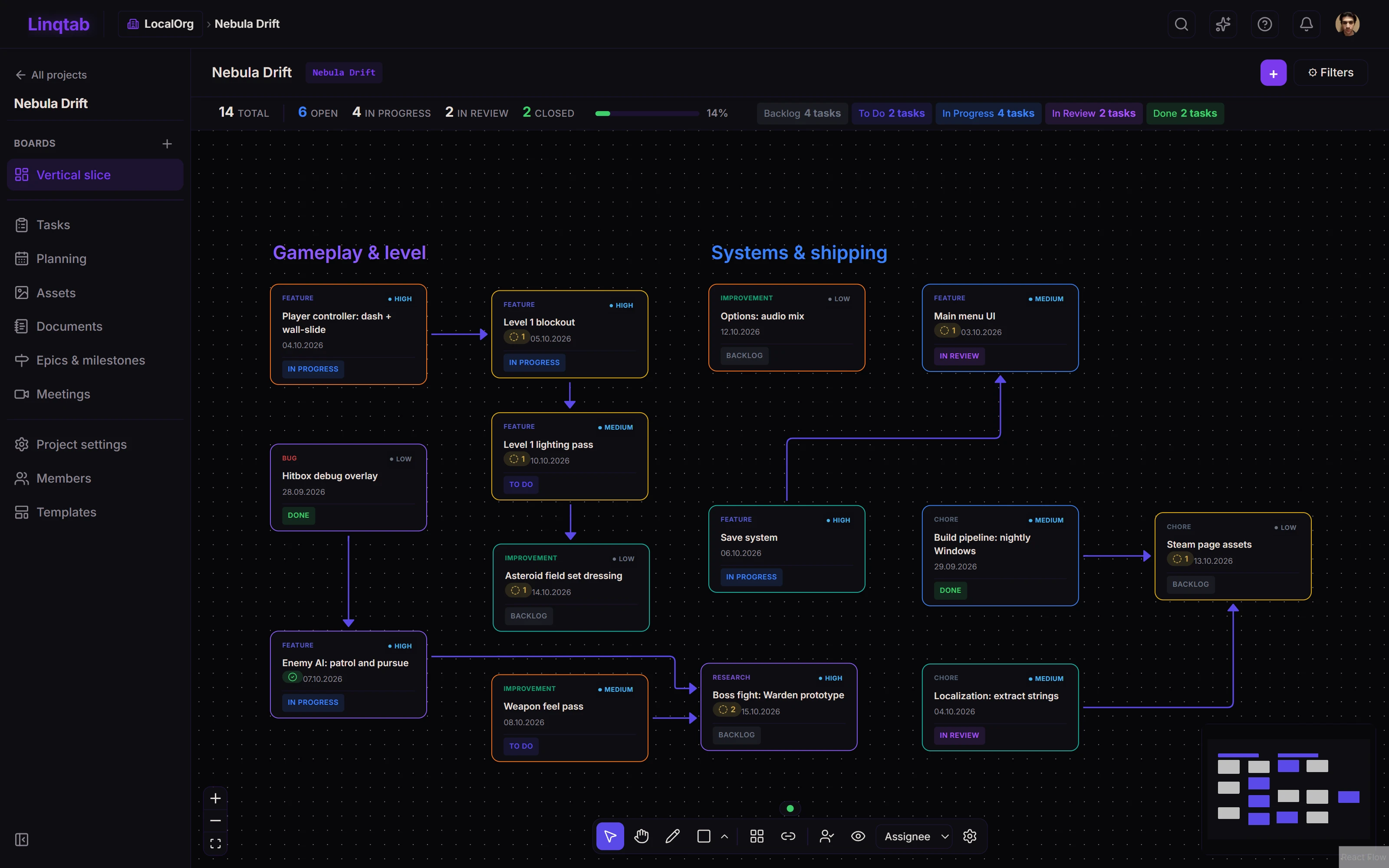
The Linqtab board canvas: task cards grouped into two areas — “Gameplay & level” and “Systems & shipping” — joined by dependency links, with the status counters above
  1. Counters for the whole board: how much is open, in progress, in review and closed.
  2. Areas group cards the way your production is split: gameplay, systems, art.
  3. A link means “blocks”: the arrow runs from the task that has to finish first.
  4. The badge counts the unfinished tasks this card still waits on.
Board canvas Areas group the work, links carry the dependencies, and the whole slice fits on one screen.

02 / The lifecycle

“Done” means five different things on your team.

Linqtab gives every task the same four stages: Created, In progress, In review, Closed. Assignees accept and submit, reviewers close or send back. Name your own statuses — the stages stay comparable across every project in the studio.

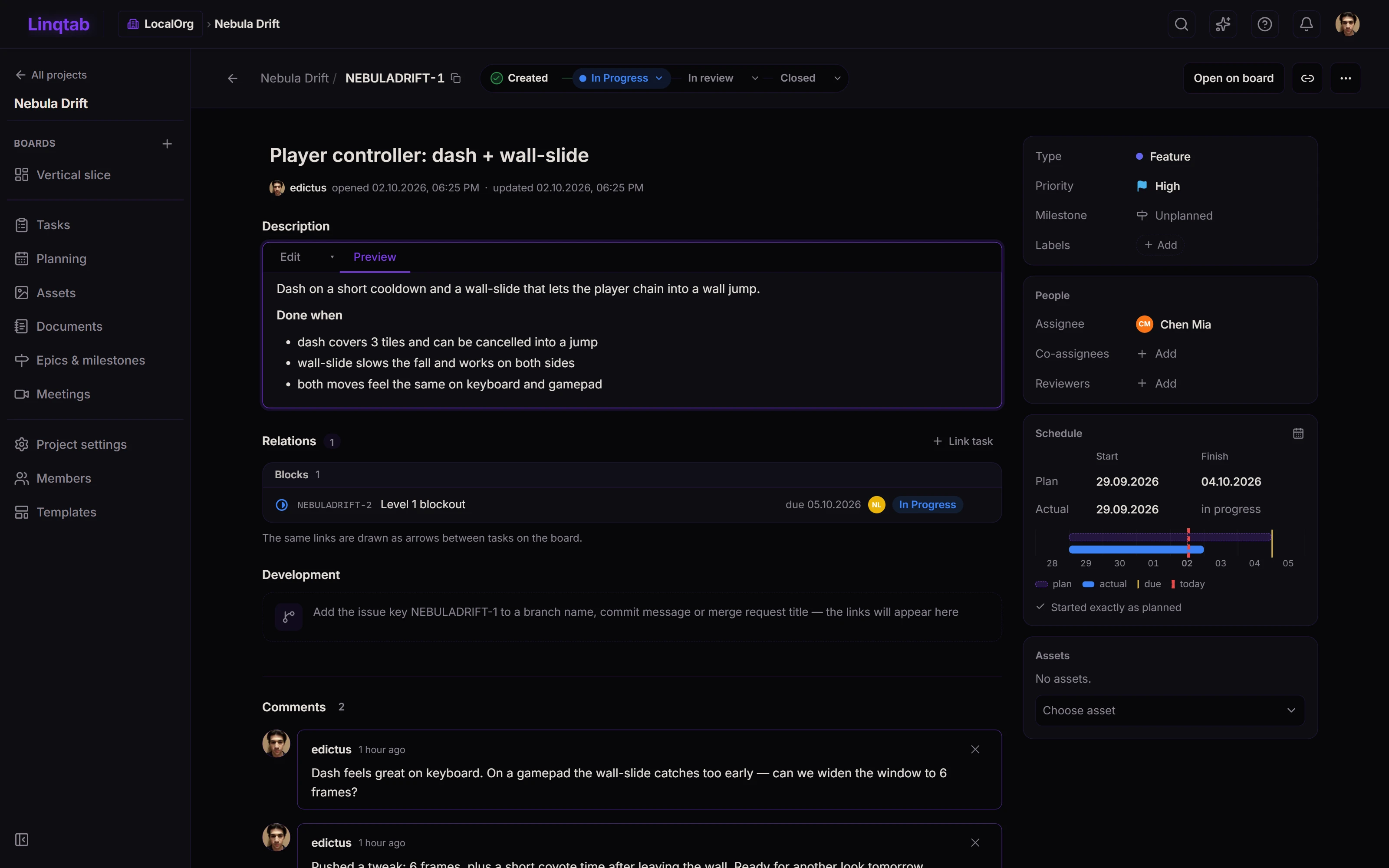
A task page in Linqtab: the lifecycle stepper with “In Progress” highlighted, the description, two comments and the field panel with priority, status, assignee and dates
  1. The lifecycle stepper: Created, In progress, In review, Closed.
  2. Relations are the same links you draw on the board.
  3. Plan versus actual: planned dates as an outline, real progress filled in.
  4. Put the task key in a branch or pull request and it shows up here.
Task lifecycle The stepper on every task: accept it, submit it for review, and let a reviewer close it or send it back.

03 / The docs

The combat spec lives in a fifth tool nobody opens.

In Linqtab it lives next to the tasks it drives: markdown documents with live co-editing, history and checkpoints. Design pillars, meeting notes and specs — one link away from the work, with two cursors in the same paragraph when it matters.

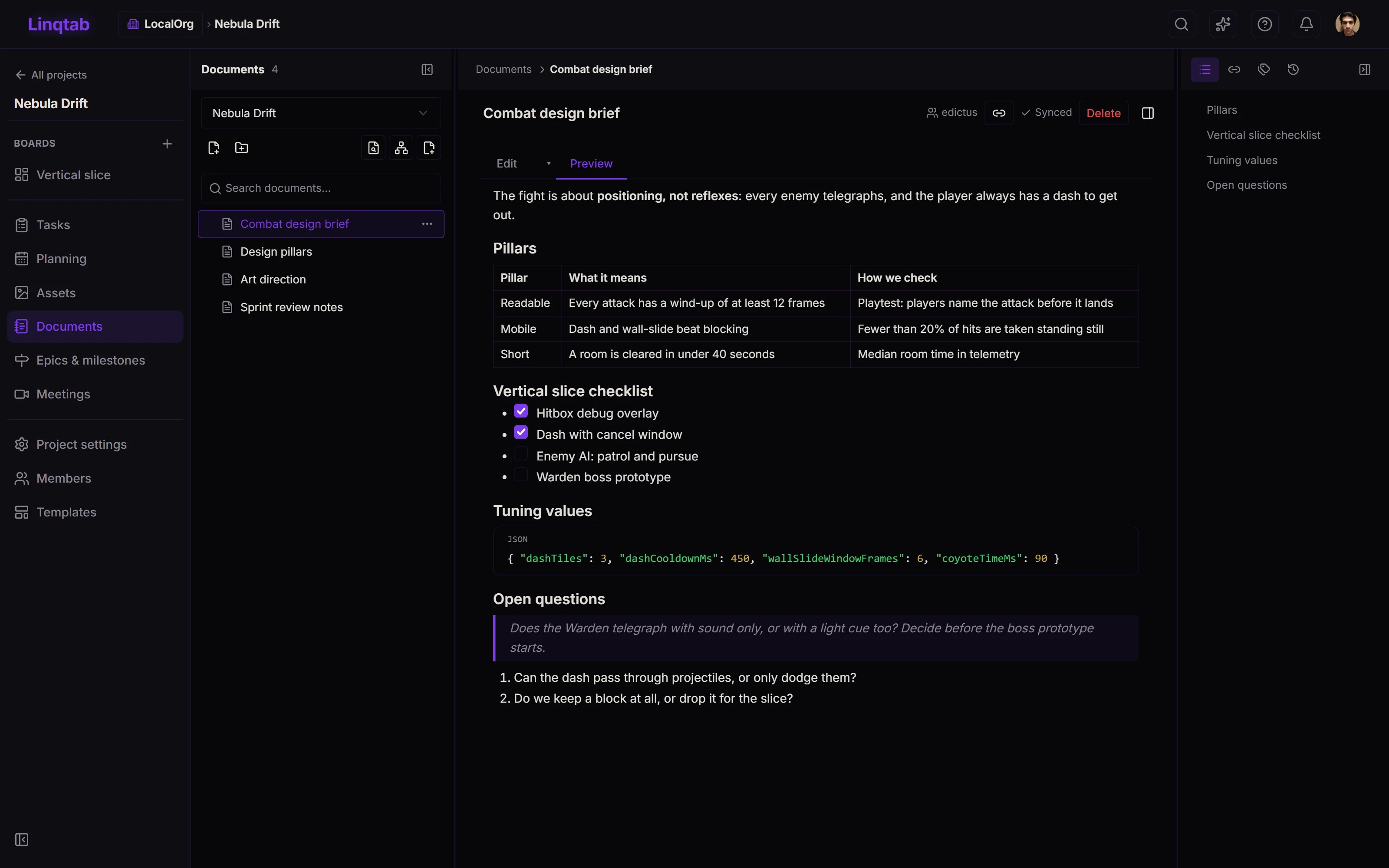
A project document in Linqtab: rendered markdown with a table, a checklist and a code block, next to the document tree and the outline
  1. Documents live in a tree inside the project, next to its tasks.
  2. Live co-editing: changes sync for everyone as you type.
  3. Full markdown: tables, checklists, code blocks and quotes.
  4. History and checkpoints, so any version is one click away.
Documents, co-edited Two people in the same spec, each with a cursor, plus history and checkpoints to fall back on.

04 / The week

Overload shows up at the milestone review. Too late.

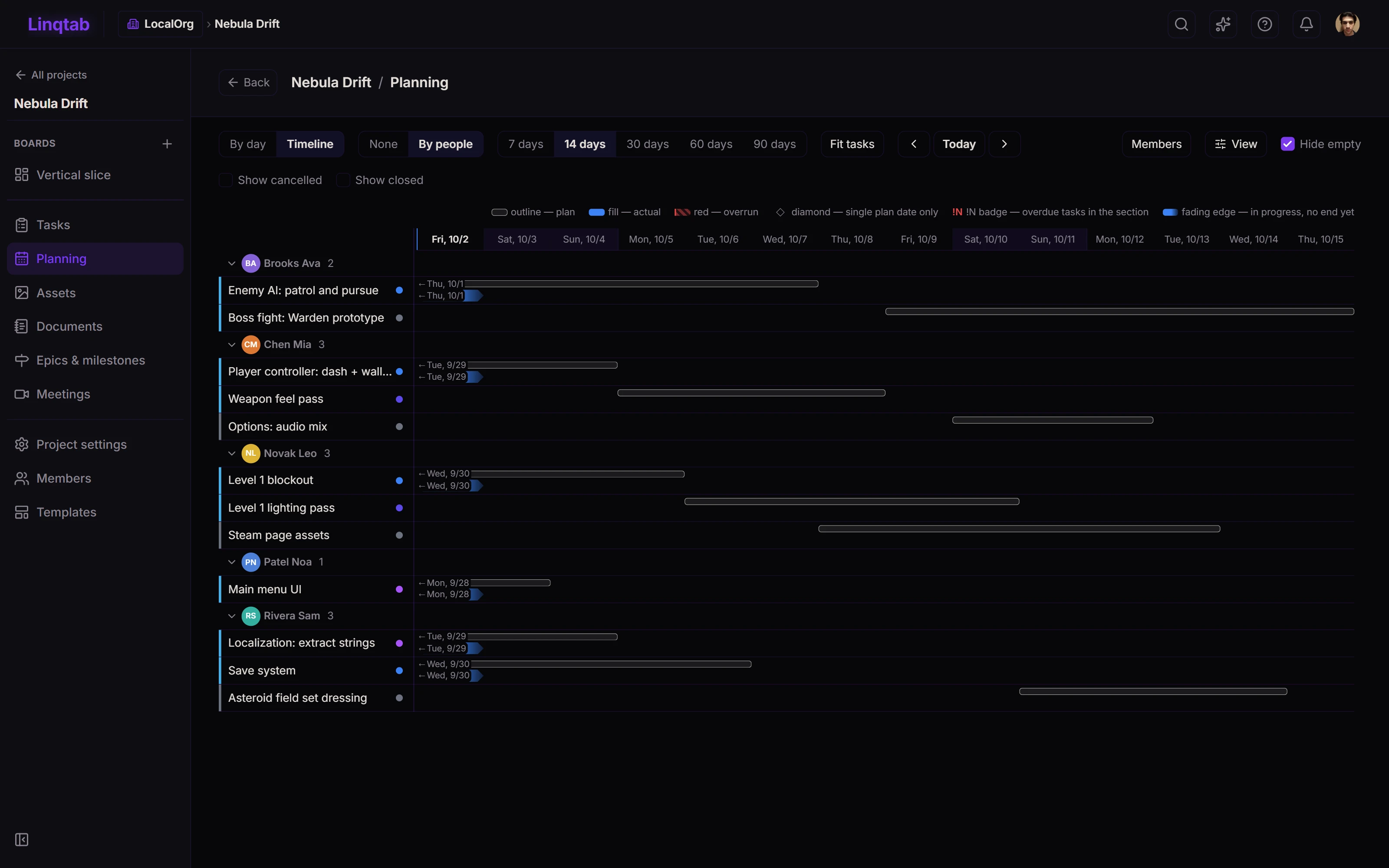
Drop work onto concrete days and read the week as bars per person. When Thursday is twice as tall as it should be, you see it on Monday — not in the post-mortem.

Day planning in Linqtab: a two-week timeline where every person gets a section and each task shows a planned bar with the actual progress filled in
  1. Every person gets a section with their tasks for the range.
  2. Look from a week up to 90 days, or fit the range to the tasks.
  3. Today stays highlighted, so slipping work is obvious.
  4. The outline is the plan, the fill is what actually happened.
Day planning Work laid out per person across the week, so overload is visible before it happens.

Also in the box

  • GitHub & GitLab: branches, pull requests and merge from the card
  • Assets with their own state and recipes
  • Epics & milestones
  • Meetings with notes and action items
  • Templates
  • Team roles & scoped permissions
  • Public REST API + OAuth2 clients
  • AI assistant, bring your own key
  • Light, dark and Eldroot themes · English, Russian

Roadmap

What we are building now

  • Short readable IDs for everything, not just tasks

The full roadmap →

Honest small print

What a public beta means here

Free, with room to work

No paid plans, no card, no trial countdown. Each organisation gets limits sized for a small studio; if you hit one and it is in your way, write to support@linqtab.com and we will raise it.

Your data, in the EU

Servers in Finland, daily backups, no advertising cookies and no third party analytics. The details are in the Privacy Policy and the Terms of Service.

The AI assistant is experimental

It is off until you turn it on, and it is bring your own key: your key stays in your browser and talks to your model provider directly. Treat it as a beta inside a beta.

It is early, and it shows

Expect rough edges and short interruptions while we deploy. Keep your own copies of anything critical, and tell us what breaks: bug reports from the first weeks shape what gets built next.

Put your next milestone on the board

Create an account, verify your email, and start with your own space. Bring the team in when the board looks like your production.